Qualification finds the fit. Email Outreach starts the conversation.
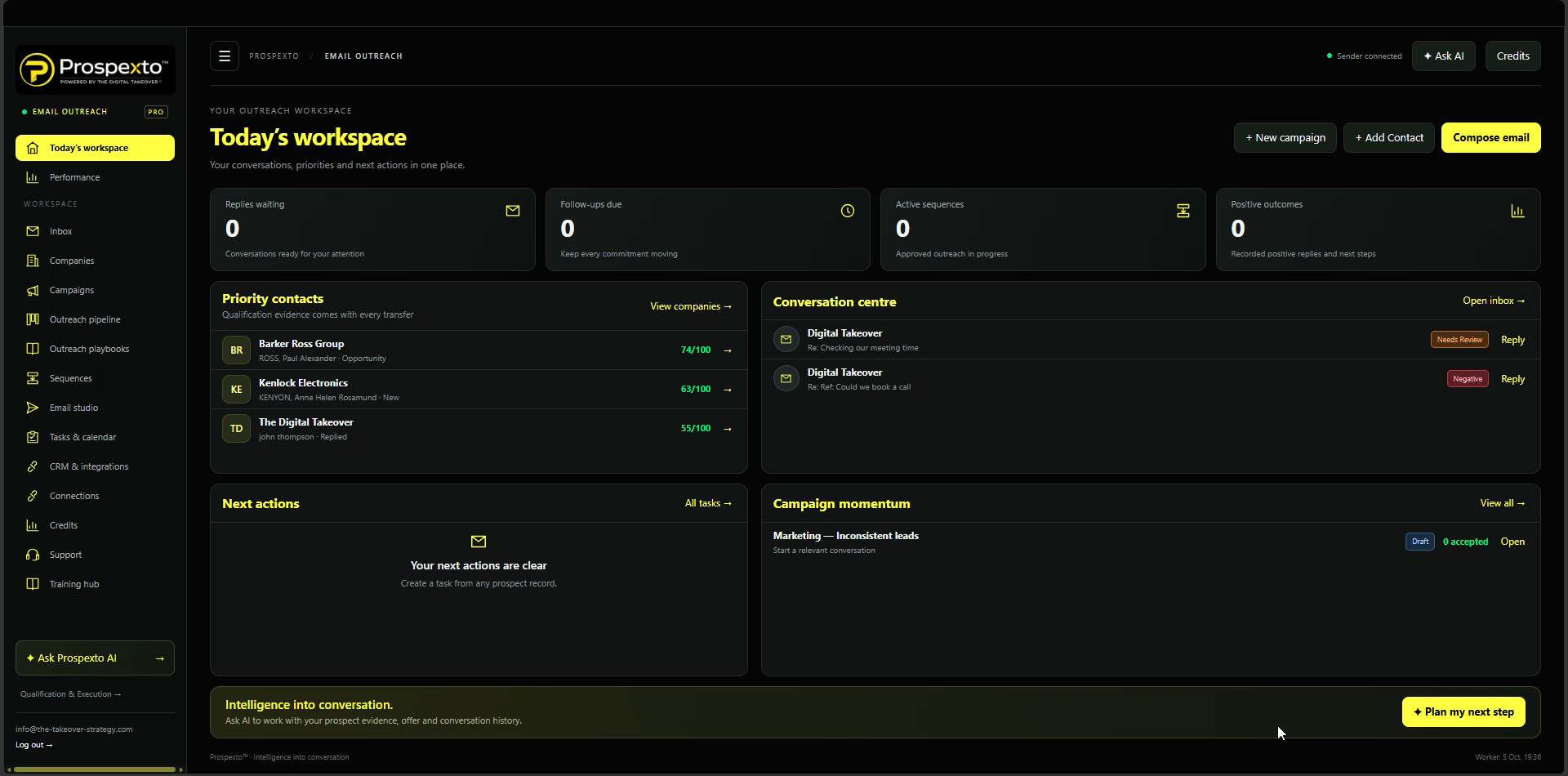
When Qualification identifies email as the right route, Email Outreach gives your team one place to prepare a relevant message, manage replies and move the next action forward.
This is one of Prospexto’s connected outreach workspaces. The prospect’s qualification evidence and campaign context guide the message; conversations, tasks and follow-up stay connected to the same Prospexto record and CRM.
Guidance that works alongside you.
Review drafts, spot conversation signals and prepare a useful next reply.
Every Email Should Start With A Reason.
Prospexto starts with Qualification: it assesses the business, records the evidence and identifies the outreach route to take. Email Outreach receives prospects selected for email, with the context needed to make contact relevant.
Campaigns, mailbox conversations, tasks and follow-up stay part of the same system, so replies can move into a useful next action instead of becoming disconnected activity.
Start With Relevance
Start from the prospect record and qualification context already held in Prospexto before writing.
COMPANY CONTEXTGive the Message Direction
Use the campaign, playbook, sequence and template that fit the qualified prospect, with AI available to help prepare a draft.
CONNECTED CAMPAIGN PLANNINGKeep the Next Step
Manage replies and turn agreed next steps into follow-up activity on the same Prospexto record.
CONVERSATION-LED FOLLOW-UPFrom Qualification to Conversation and Follow-Through.
Qualification identifies the right prospects and route. Email Outreach handles the message, inbox and next action, with the record continuing in Prospexto CRM.
Bring in Your Prospects
Receive prospects that Qualification has assessed and directed to Email Outreach. The shared prospect record brings its saved evidence and campaign context into this workspace.
Choose the Reason to Reach Out
Use the qualification findings to select or shape a relevant campaign. Set the offer, objective and claims your team can support.
Plan the Conversation
Choose an aligned playbook and follow-up sequence, or build your own timing, purpose and writing approach.
Personalise and Review
Use a niche template or write your own email. Ask AI for help with clarity, campaign fit and a useful next question, then review and approve the draft.
Send and Continue the Thread
Send approved messages through your connected mailbox, manage drafts and review matching replies in the same conversation. Use AI assistance when you want help deciding how to respond.
Keep the Relationship Moving
Record progress, create follow-up tasks or meetings and review campaign activity. The same prospect history remains available in Prospexto CRM.
Write It Yourself or Build It With AI.
Use the same company context and campaign brief whichever writing approach you choose.
Bring Your Experience to the Message
Create your own campaigns, playbooks, follow-up sequences and templates. Write in your own style, save drafts and choose when the message is ready to send.
Get Help When You Need It
Ask AI for a draft, rewrite or campaign review. Review the signals in an incoming reply and prepare a response grounded in the conversation. Applying a suggestion does not send an email.
More Than a Send Button.
Use qualification context to prepare email outreach, manage replies and keep the next action connected to the prospect.
Start With a Relevant Business Pain
Choose from campaign starting points across marketing, recruitment, property, gyms, e-commerce, coaching, accountancy, legal services, construction and health clinics. Adapt the offer to your business without assuming every prospect has the same problem.
Keep Your Approach Aligned
Use campaign-aligned niche playbooks, follow-up sequences and email templates, or build your own. Give each follow-up a clear purpose and review company enrolments before activation.
Keep the Conversation Together
Manage unread mail, sent messages, outbox and drafts. Organise positive, negative and archived replies, open the conversation and continue from the latest message.
Understand What the Prospect Is Saying
Review interest, questions, objections and missing context. Ask for practical reply guidance and draft reviews while your team remains in control of decisions and sends.
Turn Replies Into Next Actions
Move prospects through the outreach stages, create follow-up tasks, calls and meetings, and keep agreed next actions visible. Calendar tools can help schedule those actions.
See Progress Across the Journey
Review recorded outreach activity and keep messages, replies, tasks and prospect history with the shared Prospexto record. Keep the history available alongside the rest of the prospect’s activity.
Qualification Selects the Route. The System Carries It Forward.
Prospexto Qualification is where the journey begins. It identifies fit and selects the suitable next outreach: Direct Mail, Cold Calling or Email Outreach. When email is the right route, this workspace uses that prospect context to prepare the campaign, manage the mailbox conversation and plan follow-up.
Replies and next actions remain connected to the prospect in Prospexto CRM, alongside activity from the rest of the system.
Relevant Messages. Controlled Follow-Through.
Use qualification evidence to prepare the conversation, then decide what to send and how to respond. Email activity supports the wider lead generation journey; it does not replace human judgement.
✓Start with prospects directed here by Qualification.
✓Ground messages in evidence and campaign context.
✓Review and approve messages before sending.
✓Record replies and agreed next actions on the prospect.
Connect supported mailbox settings. Provider limits, sender authentication and inbox placement still apply; delivery to the inbox is not guaranteed.
Keep the qualification decision, email thread, reply and follow-up action connected to the prospect in Prospexto CRM.
Before You Get Started.
How does Email Outreach fit into Prospexto?
Qualification starts the lead generation journey by assessing fit and identifying a suitable route. Email Outreach is the connected workspace for prospects directed to email; their conversation and next actions continue through Prospexto.
Can I use my own campaigns and templates?
Yes. Choose niche campaign, playbook, sequence and template starting points, adapt them or create your own. AI can help with planning and writing when you request it.
Does AI send messages without my approval?
Applying an AI suggestion does not send an email. You review drafts and approve sequence enrolments before activation. Approved active sequences can then send automatically under the configured schedule and limits; captured replies stop further automated follow-ups.
Can I connect my existing email account?
Use provider-supported SMTP and IMAP credentials, such as an app password where required. Test sending, reply capture and sender authentication before launching a campaign. Mail provider access and limits vary.
Where are prospect records and follow-up managed?
Prospexto CRM holds the shared prospect history, including qualification context and activity from connected outreach workspaces. Follow-up tasks and next actions stay part of the same system.
Where can I review Prospexto access options?
Visit Prospexto Pricing to review the current platform access options and terms.
From the Qualified Prospect to the Next Conversation.
When Qualification directs a prospect to email, prepare a relevant message, manage the reply and keep the next action connected in Prospexto.